

A single click on the wrong repository could have put a developer’s GitHub access at risk.
Security researcher Ammar Askar disclosed a zero-day vulnerability in github.dev, GitHub’s browser-based VSCode environment, that could expose GitHub OAuth tokens through a flaw in VSCode webviews. Those tokens could give attackers access to repositories and organizational code available to the affected developer.
Microsoft introduced mitigations on June 3, according to Askar’s disclosure timeline, but the bug is a sharp reminder of how much trust modern development workflows place in browser-based coding tools.
Understanding how the vulnerability works
VSCode is a desktop coding tool owned by Microsoft, the same company that owns GitHub, a code management platform. Over time, Microsoft has tightly integrated both tools to make moving between coding and code management seamless.
One example is github.dev, a browser-based version of VSCode that lets developers open and edit repositories directly from GitHub using GitHub OAuth credentials. According to security researcher Ammar Askar, trusted integration is what made the vulnerability possible.
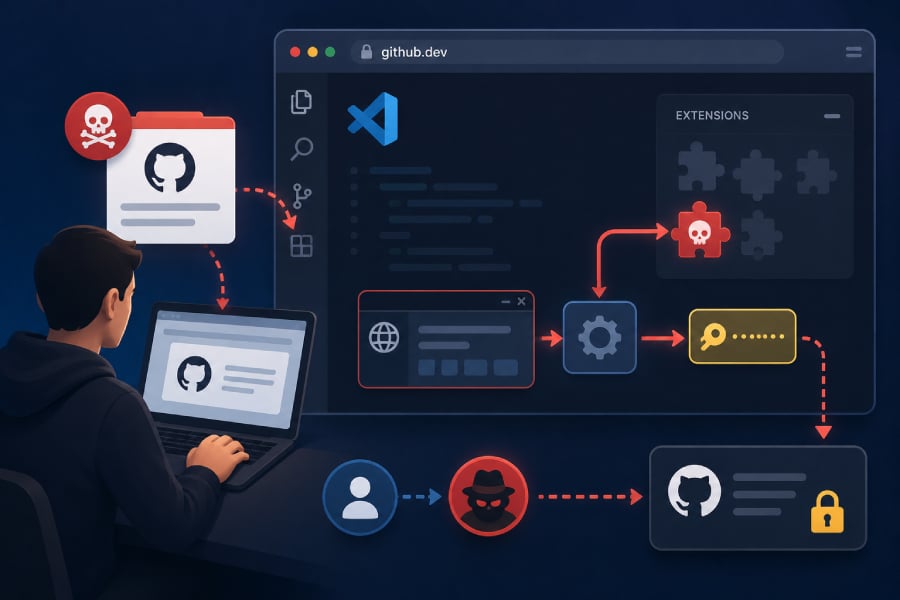
Askar notes that the attacker begins by tricking a developer into opening a compromised repository using github.dev. The repository, in turn, loads a malicious extension into the workspace.
The issue stems from the way the extension communicates with VSCode via a webview. According to Askar, a bug in github.dev’s webview allowed a malicious extension to escape the sandbox and steal GitHub tokens, enabling an attacker to impersonate the developer.
Beyond having read access, the attacker could also gain write access to available repositories. That could let them delete codebases, clone private repositories, or push malicious code to production software.
For a better understanding of how this works, refer to the proof-of-concept Askar dumped.
Must-read security coverage
How developers can stay safe
Aside from being careful with the repositories they open, developers can also protect against this vulnerability by clearing cached data for github.dev.
To do that:
- Click Site Settings from your URL bar
- Click on cookies and site data
- Click Delete data
The exact steps for this will depend on your browser.
The vulnerability was not left unaddressed for long. Askar’s disclosure timeline shows that GitHub received an hour’s notice before publication, with Microsoft introducing an initial safeguard on June 3 and following it up with a broader fix later that day. That response reduces the immediate risk, but the disclosure highlights how valuable GitHub authentication tokens can be if stolen.
Also read: Grafana refused a ransom demand after attackers used a stolen GitHub token to download code from private repositories.