
Dropbox is still a reliable cloud storage and file-sharing tool, but it is no longer the obvious default for every user or business. Its free plan is limited, and many teams now need more specialized features, such as stronger privacy controls, better collaboration tools, deeper Microsoft or Google integration, cloud backup, lifetime storage options, or enterprise-grade file management.
For most users, Google Drive is the best Dropbox alternative because it offers generous free storage, real-time collaboration, and tight integration with Google Docs, Sheets, Slides, Gmail, and Google Workspace. But depending on your needs, another provider may be a better fit:
- Best overall Dropbox alternative: Google Drive
- Best for privacy-focused teams: Sync
- Best free storage allowance: Mega
- Best for Microsoft 365 users: Microsoft OneDrive
- Best for lifetime storage plans: pCloud
- Best for cloud backup: IDrive
- Best for clean interface and virtual drive use: Icedrive
- Best for businesses and enterprises: Box
- Best for encrypted file storage: NordLocker
What is Dropbox?
Dropbox is a cloud-based file storage and sharing service that lets users save files in one central location and access them across compatible devices. By adding Dropbox to a desktop, phone, or tablet, users can automatically sync files, share folders with others, back up important documents, and collaborate on work without relying on local storage or email attachments.

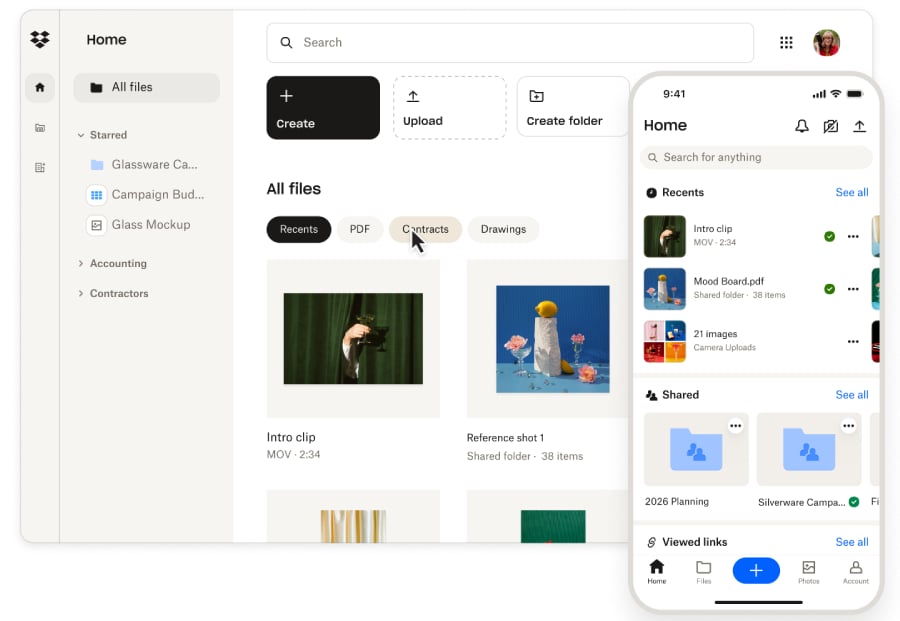
Dropbox is still a strong option for simple file syncing and sharing, but it is no longer the only practical cloud storage choice. Many users now compare Dropbox against tools with more free storage, stronger collaboration features, built-in productivity suites, lifetime storage plans, or privacy-focused encryption.
Hidden costs associated with Dropbox
Dropbox offers a free Basic plan, but its 2GB storage limit can fill up quickly, even for casual users. That makes it less generous than alternatives like Google Drive, Mega, pCloud, IDrive, and Icedrive, which offer more free storage upfront.
The first major paid individual plan, Dropbox Plus, increases storage to 2TB for one user and costs $11.99 per month, or $9.99 per month when billed annually. That equals $119.88 per year. This may be reasonable for one person who wants simple syncing and file recovery, but it may not be the best value for users who mainly need free storage, encrypted storage, or access to productivity tools.
Costs can rise more quickly for teams. Dropbox Standard starts at $15 per user per month when billed annually, includes 5 TB of team storage, and requires at least 3 users. A 10-person team would cost about $1,800 per year before add-ons, higher-tier upgrades, or additional storage needs. Businesses comparing Dropbox alternatives should look beyond storage limits and consider admin controls, security features, collaboration tools, recovery windows, integrations, and total annual cost.
SEE: Checklist: Cloud storage management (TechRepublic Premium)
Best Dropbox alternatives
Google Drive
Google Drive is the best overall Dropbox alternative for most users because it combines free cloud storage, real-time collaboration, and tight integration with Google’s productivity tools. Anyone with a Google account can use Drive to store, share, and collaborate on files through Google Docs, Sheets, Slides, Gmail, and Google Workspace.
For most accounts, the free plan includes 15GB of storage shared across Google Drive, Gmail, and Google Photos. That is far more generous than Dropbox’s free 2GB limit, though users with large photo libraries, email archives, or shared files may still need to upgrade to a paid Google One or Google Workspace plan.
Google Drive is strongest for collaboration, but it is not the best choice for privacy-focused users. If zero-knowledge encryption or encrypted vault storage is your top priority, Sync, Mega, or NordLocker may be a better fit.
Key features of Google Drive
- 15GB of free storage across Drive, Gmail, and Google Photos.
- Real-time collaboration in Docs, Sheets, and Slides.
- Tight integration with Gmail, Calendar, Meet, and Google Workspace.
- Easy file sharing with permissions and link controls.
- Desktop and mobile apps for cross-device access.
Sync
Sync is the best Dropbox alternative for privacy-focused teams because it emphasizes secure file storage, encrypted sharing, and stronger privacy controls. This makes it a good fit for businesses and individuals who want to collaborate without giving the provider broad access to stored files.
Its zero-knowledge encryption is the biggest differentiator. Unlike mainstream storage tools built primarily around productivity ecosystems, Sync is designed for users who want secure file sharing, version history, rollback, and team collaboration with stronger privacy protections.
Overall, Sync is not as deeply integrated with Google Workspace or Microsoft 365 as Google Drive or OneDrive, but it is a better fit for users who prioritize security over ecosystem convenience.
Key features of Sync
- Zero-knowledge encryption.
- Secure file sharing and access controls.
- Version history and rollback.
- Team folders and collaboration tools.
- Desktop, web, and mobile access.
Mega
Mega is the best Dropbox alternative for free storage allowance. Its free plan offers up to 20 GB of storage, which is more than Dropbox, Google Drive, OneDrive, and many other mainstream cloud storage providers, making it a strong choice for users who need more room without paying right away.
Mega also stands out for privacy. It offers end-to-end encryption and strong security features, which make it more appealing to users who are uncomfortable storing sensitive files in standard productivity-suite storage tools.
The trade-off is that Mega may not feel as polished for business collaboration as Google Drive, OneDrive, or Box. It works best for users who want generous free storage, privacy, and flexible syncing rather than built-in productivity apps.
Key features of Mega
- Generous free storage allowance.
- End-to-end encryption.
- Desktop and mobile apps.
- Flexible syncing options.
- Secure file sharing.
Microsoft OneDrive
Microsoft OneDrive is the best Dropbox alternative for Microsoft 365 users. It integrates directly with Word, Excel, PowerPoint, Outlook, Teams, SharePoint, and Windows, making it one of the easiest Dropbox replacements for businesses already working in Microsoft’s ecosystem.
The free version includes 5GB of storage, which is more than Dropbox but less than Google Drive, Mega, pCloud, IDrive, and Icedrive. The real value comes from Microsoft 365 plans, which include OneDrive storage alongside the Microsoft productivity apps many businesses already use.
However, OneDrive is not the strongest option for zero-knowledge encryption. But it is one of the most practical choices for Windows users and Microsoft-heavy teams who want cloud storage integrated into daily work.
Key features of Microsoft OneDrive
- 5GB of free storage.
- Built into Windows and Microsoft 365.
- Real-time collaboration in Word, Excel, and PowerPoint.
- File sharing, version history, and recovery tools.
- OneDrive Personal Vault for added file protection.
pCloud
pCloud is the best Dropbox alternative for lifetime storage plans. Unlike most cloud storage services that rely only on monthly or annual subscriptions, pCloud offers lifetime plans that can make long-term storage more cost-effective for some users.
The free plan can offer 10GB of storage, but it requires a series of steps to access it, which can be a hindrance for new users. However, paid plans are available for users who need more space. pCloud also supports file sharing, versioning, media playback, and cross-platform access, making it a strong choice for users with large personal archives, media libraries, or long-term storage needs.
Privacy-focused users should note that pCloud’s strongest encryption features may require an additional paid option. Still, its lifetime pricing and strong syncing tools make it one of the clearest alternatives to Dropbox for long-term value.
Key features of pCloud
- 10GB of free storage.
- Annual and lifetime storage plans.
- File sharing with link controls.
- File versioning and recovery.
- Built-in media playback and cross-platform apps.
IDrive
IDrive is the best Dropbox alternative for cloud backup. While Dropbox is primarily built for syncing and sharing, IDrive is better suited for users who want to back up computers, phones, servers, and external drives to the cloud.
To support this, IDrive includes a 10GB free plan and offers strong value for users who need large backup capacity and data storage. It also supports file versioning, recovery, and multi-device backup, making it useful for individuals and businesses that prioritize data protection over document collaboration.
Still, IDrive is not the best fit if your main priority is real-time co-editing or team document workflows. But if your goal is to protect files across multiple devices, it is one of the strongest Dropbox alternatives.
Key features of IDrive
- 10GB of free storage.
- Cloud backup for multiple devices.
- File versioning and recovery.
- Automatic backup and sync options.
- Support for Windows, macOS, Linux, iOS, and Android.
Icedrive
Icedrive is the best Dropbox alternative for users who want a clean interface and virtual drive experience. Its web and app interfaces are easy to navigate, and its Windows virtual drive feature lets users access cloud files in a way that feels closer to using local storage.
The free plan includes 10GB of storage, which is more generous than Dropbox’s free tier. Paid plans add more storage and encryption features, making Icedrive a good option for users who want simple storage with a modern interface.
However, Icedrive can be less compelling for teams that need deep collaboration features. Instead, I recommend it for individuals or small teams that prioritize clean design, file previews, fast access, and straightforward cloud storage.
Key features of Icedrive
- 10GB of free storage.
- Clean web and app interface.
- Windows virtual drive functionality.
- File previews for common formats.
- Encryption options on paid plans.
Box
Box is the best Dropbox alternative for businesses and enterprises. It offers business-focused file sharing, content management, admin controls, security features, workflow tools, and integrations with major productivity platforms.
Box’s free plan includes 10GB of storage, but the platform is clearly designed for teams and organizations rather than casual individual users. Its business plans are more expensive than some consumer-focused storage services, but they include controls that companies often need, such as permissions, compliance features, workflow automation, and app integrations.
The biggest reason I recommend Box over Dropbox is enterprise readiness. It is a strong fit for businesses that need file storage, collaboration, governance, and integrations in a secure content management platform.
Key features of Box
- 10GB free individual plan.
- Business file sharing and content management.
- Admin controls and enterprise security features.
- Google Workspace and Microsoft 365 integrations.
- Workflow automation and app integrations.
NordLocker
NordLocker is the best Dropbox alternative for encrypted file storage. Built by the company behind NordVPN, it focuses on privacy, secure vaults, and encrypted syncing rather than broad productivity-suite collaboration.
At the same time, NordLocker’s free plan is smaller than many competitors’, but its privacy-first approach makes it useful for users who need to store sensitive files securely. Paid plans offer more storage, cross-device syncing, and access to encrypted file vaults.
With that said, NordLocker is not the best choice for team document editing or business collaboration. It is strongest for individuals and small teams who want a simple way to encrypt files before syncing them to the cloud.
Key features of NordLocker
- Encryption-first cloud storage.
- Secure file vaults.
- Automatic cross-platform syncing.
- Zero-knowledge architecture.
- Strong fit for sensitive personal or business files.
What’s hot at TechRepublic
Methodology: How I evaluated Dropbox alternatives
To evaluate the best Dropbox alternatives, I focused on cloud storage services that can replace or improve on Dropbox’s core functions: file storage, syncing, sharing, collaboration, backup, cross-device access, and security. I prioritized tools that are practical for individuals, freelancers, small teams, and businesses rather than basic storage apps with limited real-world use.
I also considered why someone might leave Dropbox in 2026. Some users need more free storage, while others want better Microsoft or Google integration, stronger encryption, lower long-term costs, lifetime storage plans, backup features, or enterprise controls. Because these needs vary, I evaluated each provider based on its best-fit use case rather than ranking every tool by storage size alone.
The main evaluation criteria included:
- Free storage and plan value: I reviewed free storage limits, paid plan pricing, annual discounts, lifetime options, business plans, and whether the provider offers enough value compared with Dropbox.
- File syncing and sharing: I looked at desktop sync, selective sync, folder syncing, link sharing, password-protected links, expiration dates, version history, file requests, and collaboration controls.
- Security and privacy: I considered encryption methods, zero-knowledge or end-to-end encryption options, two-factor authentication, data center policies, compliance features, and privacy-focused design.
- Collaboration tools: I evaluated document editing, team folders, comments, permissions, compatibility with Microsoft Office and Google Workspace, and support for business workflows.
- Platform support: I reviewed availability across Windows, macOS, Linux, iOS, Android, web browsers, and desktop sync clients.
- Backup and recovery: I considered automatic backups, file versioning, deleted-file recovery, ransomware protection, and whether the tool works better as backup software or as cloud storage.
- Ease of use: I assessed interface quality, setup experience, file organization, mobile usability, and the ease with which teams or individuals can switch from Dropbox.
- Best-fit use case: I matched each provider to the user or business need it serves best, such as privacy, collaboration, backup, enterprise storage, or low-cost long-term storage.
I gave more weight to services that provide a clear reason to choose them over Dropbox. For example, Google Drive and OneDrive are strongest for productivity-suite users; Sync and NordLocker are stronger for privacy; pCloud stands out for lifetime storage; IDrive is better for backup; and Box is better for enterprise file management.
Frequently asked questions (FAQs)
What is the best free Dropbox alternative?
Mega offers one of the most generous free storage plans, while Google Drive is the best free Dropbox alternative for collaboration. Google Drive gives users 15GB of free storage across Google Drive, Gmail, and Google Photos, while Mega provides more free storage for users who prioritize capacity and privacy.
Is Dropbox still worth using?
Dropbox is still worth using if you value its simple syncing, file sharing, collaboration features, and broad app support. However, users may prefer an alternative if they need more free storage, stronger privacy, lower long-term pricing, deeper Microsoft or Google integration, enterprise controls, or backup-focused features.
What should I look for in a Dropbox alternative?
Look for storage limits, pricing, file syncing, sharing controls, version history, deleted file recovery, encryption, platform support, collaboration tools, mobile apps, and integrations with the software you already use. Businesses should also compare admin controls, compliance features, team permissions, and support options.